The short answer
EasySend and DocuSign solve different problems.
EasySend is a digital customer interaction platform that helps organizations collect data, automate workflows, generate documents, integrate with CRM systems, and capture legally binding signatures in a single experience.
DocuSign primarily focuses on e-signatures and agreement workflows.
If your process starts with collecting information from customers, validating it, routing it to internal systems, generating documents, and obtaining signatures, EasySend manages the entire workflow. If you only need a signature on an existing document, DocuSign is a strong solution.
What EasySend does
EasySend transforms paper forms, PDFs, and manual customer-facing processes into digital journeys.
Instead of sending a PDF, waiting for it to be completed, and manually entering information into your systems, EasySend creates guided experiences that adapt to each customer's situation.
Customers receive a link, complete a personalized workflow, upload documents when needed, sign digitally, and submit their information. The data is validated, routed, and synchronized directly with your CRM, policy administration system, EHR, or other business applications.
EasySend combines capabilities that organizations often manage across multiple tools:
- Customer data collection
- Workflow automation
- Dynamic document generation
- E-signature
- CRM integration
- Automated reminders and follow-ups
- Multi-party collaboration
Business users can update journeys without developer involvement, reducing the time required to adapt to changing business and compliance requirements.
What makes EasySend different from DocuSign
DocuSign is designed to collect signatures on documents.
EasySend is designed to digitize customer-facing workflows from start to finish.
While both platforms support electronic signatures, the difference appears in everything that happens before and after the signature.
Customer data collection
EasySend collects structured customer information through interactive digital experiences.
DocuSign primarily collects signatures on static documents.
Dynamic experiences
EasySend adapts questions, forms, and workflows based on customer responses.
A first-time policyholder, existing customer, Medicare patient, or high-net-worth investor can each see a different experience within the same workflow.
DocuSign generally presents the same document to every recipient.
Workflow automation
EasySend automates approvals, reminders, notifications, routing, document requests, and follow-up actions.
DocuSign focuses on document distribution and signing workflows.
CRM and system integration
EasySend synchronizes customer data directly with business systems including Salesforce, HubSpot, Monday.com, Microsoft Dynamics, AgencyZoom, and custom applications.
This eliminates manual re-entry and reduces data quality issues.
Multi-party customer journeys
Many customer-facing processes involve agents, advisors, brokers, managers, compliance teams, and customers working together.
EasySend is designed to support these complex, multi-step workflows within a single experience.
Why companies move beyond DocuSign
Organizations rarely replace DocuSign because they are dissatisfied with electronic signatures.
Instead, they outgrow the manual processes surrounding signatures.
Common challenges include:
- Customers submitting incomplete information
- Missing fields requiring follow-up emails and calls
- Manual data entry into Salesforce and other systems
- Separate tools for forms, signatures, and workflow automation
- Compliance updates requiring document redesign
- Limited visibility into where customers abandon a process
- Fragmented customer experiences across multiple systems
EasySend addresses these challenges by combining customer data collection, workflow automation, document generation, CRM integration, and e-signature into a single platform.
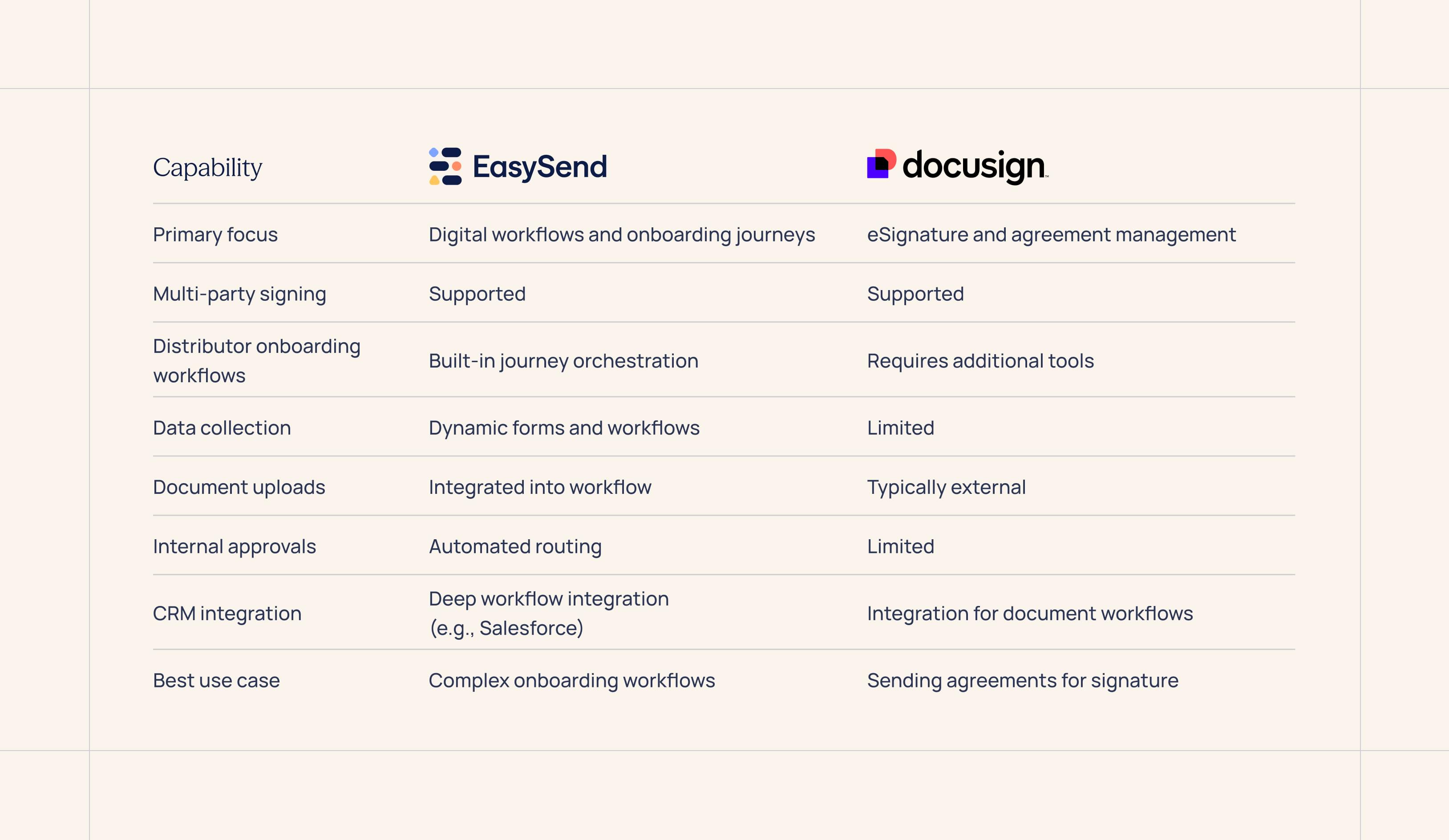
Side-by-side comparison
EasySend vs DocuSign for insurance
Insurance workflows involve significantly more than collecting signatures.
Organizations need to gather information, validate responses, collect supporting documents, generate forms, obtain approvals, and synchronize data with policy administration systems.
Common insurance use cases include:
- First Notice of Loss (FNOL)
- Claims intake
- Policy renewals
- Policy endorsements
- Agent onboarding
- Underwriting intake
- Billing and payment authorization
Many insurance organizations use DocuSign for signatures but still rely on emails, PDFs, and manual processing for the rest of the workflow.
EasySend digitizes the entire process.
EasySend vs DocuSign for financial services
Financial institutions manage highly regulated onboarding processes that require data collection, verification, compliance checks, document generation, and signatures.
Examples include:
- KYC and AML workflows
- Loan origination
- Account opening
- Wealth management onboarding
- Commercial lending applications
- Financial advisor onboarding
These processes typically require conditional logic because every customer situation is different.
EasySend adapts the experience based on customer responses while synchronizing information directly into CRM and core banking systems.
EasySend vs DocuSign for healthcare
Healthcare organizations need secure, compliant patient intake workflows that often involve multiple stakeholders and changing requirements.
Examples include:
- Patient intake
- Enrollment
- Prior authorization
- Consent collection
- Medical equipment onboarding
- Referral management
While DocuSign can support the signature portion of these workflows, healthcare organizations frequently require additional tools to collect data, manage intake, and integrate with clinical systems.
EasySend brings these capabilities together in a single experience.
Common questions buyers ask
Is EasySend an alternative to DocuSign?
Yes, for customer onboarding, intake, and workflow automation use cases.
EasySend includes e-signature capabilities but extends beyond signatures to cover data collection, workflow orchestration, document generation, and system integration.
Can EasySend and DocuSign be used together?
Yes.
Some organizations continue using DocuSign for contract management while using EasySend for onboarding, intake, claims, KYC, and customer-facing workflows.
What is the biggest difference between EasySend and DocuSign?
DocuSign focuses on signatures.
EasySend focuses on the complete customer journey, including data collection, workflow automation, document generation, integrations, and signatures.
What types of organizations use EasySend?
EasySend is commonly used by:
- Insurance carriers, agencies, brokers, MGAs, and TPAs
- Banks and financial institutions
- Healthcare providers
- Lending organizations
- Enterprises with complex onboarding and intake processes
How does EasySend support compliance?
EasySend provides a full audit trail, enterprise security controls, e-signature compliance, and support for regulatory requirements across industries including insurance, healthcare, and financial services.
Which systems does EasySend integrate with?
EasySend offers native integrations with Salesforce, HubSpot, and Monday.com, along with APIs and integration options for Microsoft Dynamics, AgencyZoom, policy administration systems, EHRs, and other enterprise applications.
When DocuSign is the right choice
DocuSign is an excellent option when your requirement is straightforward:
You have a document and need a legally binding signature.
For contract execution, approvals, NDAs, and simple document signing workflows, DocuSign remains one of the most widely recognized e-signature platforms available.
The real question
The real question isn't whether you need e-signature software.
Most organizations already have that.
The question is whether your customer interactions still rely on disconnected forms, PDFs, emails, and manual data entry.
If your process starts with collecting information, validating it, routing it, generating documents, and obtaining a signature, EasySend replaces the entire workflow—not just the signature step.
That's the difference between an e-signature platform and a digital customer interaction platform.
EasySend helps insurance companies, financial institutions, healthcare organizations, and enterprise teams digitize customer onboarding, intake, and workflow automation without relying on multiple disconnected tools.
FAQ

Forget forms. Create digital customer journeys.


